


Kids Numbers and Math
4.1114.00 Reviews
App Specs
- Version
- 2.6.1
- Updated On
- License
- $2.99
- Downloads
- 100,000+
- Developer
- Intellijoy Educational Games for Kids
- Categories
- Educational
- Platform
- Android
Screenshots
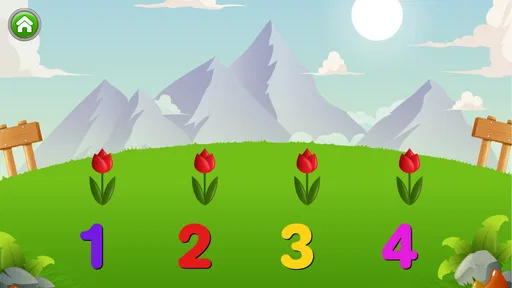
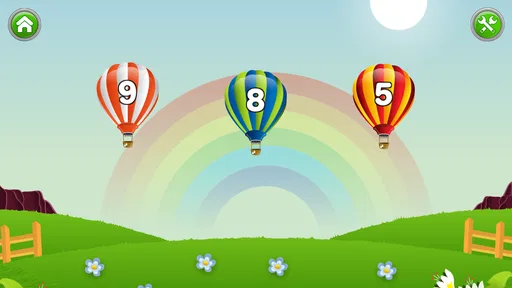
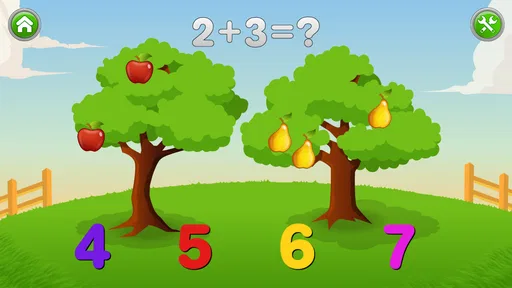
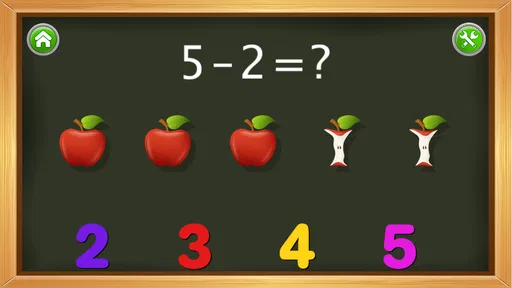
 Analysis by AppCompare
Learning early math can be difficult when a child is still becoming comfortable with numbers, symbols, and the simple rhythm of counting. Kids Numbers and Math takes a focused approach: it is an educational game from Intellijoy Educational Games for Kids, designed around number recognition and basic math practice rather than a large collection of unrelated activities. I found that narrow purpose useful because it makes the app easy to understand for both children and adults. You know what kind of practice you are opening, and you can bring it into a short routine without turning a tablet session into a full lesson.
The game is aimed at Everyone and costs $2.99, which places it in the paid-app category rather than the free, advertisement-supported learning tools many families try first. Its average rating is 4.1 from around 1.1 thousand ratings, and it has passed 100 thousand installs. Those figures suggest that it has found a steady audience, although they should not be treated as proof that it suits every learning style. My overall impression is that it works best as a calm, repeatable introduction to early number work, especially when an adult is nearby to give encouragement and adjust the pace.
How the learning experience feels in everyday use
I find the most useful way to judge this kind of number game is to watch whether a child can move from spotting a numeral to thinking about what it represents. That shift is easy to miss when an answer is only a tap, so I’d keep the practice relaxed and make room for a little talking or counting alongside the screen. With that in mind, the next section looks at how to turn a brief play session into a more meaningful everyday routine.
Readable presentation and a simple route through practice
The strongest part of this game is its directness. A young child does not need to understand a complicated menu before beginning. The idea is to interact with numbers and receive immediate practice in the fundamentals. That matters for children who are easily distracted by busy interfaces, because the learning goal remains visible instead of being buried under layers of options.
I would introduce it by sitting with the child for the first few sessions and watching how they interpret each screen. Some children immediately understand that a number represents a quantity; others need to count objects aloud or use their fingers before the symbol makes sense. The app is most helpful when it is treated as a prompt for that conversation, not as a replacement for it. If a child taps quickly without looking, I would pause and ask them to say the number first, then choose.
Readability is not only about large symbols. It is also about whether the child can tell what action is expected. In a good short session, the child should be able to distinguish the number being practiced from the answer choices and understand when a response has been accepted. I found this kind of visual separation more valuable than decorative animation. It lowers the amount of explanation an adult has to provide and lets the child concentrate on the relationship between counting and written numbers.
There is also a useful distinction between recognizing an answer and understanding it. A child may learn to select the familiar-looking symbol without being able to count a group of objects independently. To avoid that trap, I would alternate between asking, “Which number is this?” and “Can you show me how many?” away from the screen. That small change turns a tap into a check of genuine understanding.
Worth Reading Before You Choose

EA SPORTS FC Mobile 26 Is a Bigger Football Game, but It Takes Time

Flipboard Shows What News Apps Must Do Beyond the Feed

Switching to Android Auto Means Rethinking Your Driving Routine

Google Calendar Makes a Crowded Week Easier to Manage

Ludo King Makes the Most of the Minutes Between Plans

Baby Panda World Brings Quick Play to Modern Phones, but Its Game Library Feels Busy
Supporting different abilities without forcing one pace
Children do not arrive at early math with the same strengths. One may be confident with spoken counting but uncertain about written digits. Another may recognize symbols quickly but struggle with one-to-one counting. This game can fit both situations when the adult changes the surrounding activity. For the first child, I would name the displayed numbers and connect them to household objects. For the second, I would slow down and count physical items before returning to the game.
A particularly effective workflow is to use the app as the middle step in a three-part routine: begin with real objects, practice the corresponding numbers on the device, and finish by asking the child to find that quantity again in the room. For example, after working with a small number, a child could collect the same number of blocks or socks. This prevents screen success from becoming an isolated skill and gives children who learn through touch or movement another way into the lesson.
Children who need more time may benefit from repeating a familiar activity rather than being pushed toward variety. Repetition can look unexciting to an adult, but it is often exactly what makes number symbols feel stable. I would keep sessions brief, stop before frustration becomes obvious, and return later instead of treating mistakes as a contest. The game is better suited to patient practice than to timed performance or competitive scoring.
Motor and sensory considerations in a real household
For a child with developing fine-motor control, tapping a target can be harder than understanding the math. A missed touch may therefore say more about hand control, posture, or the size of the device than about number knowledge. I recommend placing the device on a stable surface and allowing the child to use one deliberate finger rather than asking them to hold it in the air. An adult can also point to the intended area while the child makes the final selection.
This is one reason I would avoid correcting every inaccurate tap immediately. First ask the child to identify the answer verbally or by pointing. If they know it but cannot select it reliably, the barrier is probably motor rather than mathematical. You can then count the response as a learning success while practicing the touch separately. That approach is more encouraging for children with coordination difficulties and gives parents a clearer picture of what needs support.
Sensory comfort also varies widely. A child who is sensitive to bright screens, sound, or repeated feedback may prefer the app in a quiet room with the device brightness adjusted to a comfortable level. I would not use it as a calming activity in a crowded or noisy environment unless the child already tolerates that setting. The most productive use I found was a predictable moment, such as after breakfast or before a quiet play period, when there were fewer competing sounds and interruptions.
Children with attention differences may need the adult to make the goal smaller than “finish a lesson.” One or two successful interactions can be enough for a first session. A simple verbal cue such as “look, count, choose” gives the child a repeatable sequence without adding another visual demand. If the child begins tapping randomly, I would end the activity or switch to physical counting rather than increasing pressure. The game should support attention, not become a test of endurance.
Where it fits when internet, time, or supervision changes
A major practical benefit of a focused paid game is that it can become part of a planned routine without requiring a large setup. I can imagine using it during a short wait at home, during a quiet transition between activities, or as a five-minute practice period before getting ready for school. The best results come when the adult decides the purpose in advance: recognizing a few numbers, matching counting to symbols, or simply building confidence with the interface.
Families should also think about device context. A phone may be convenient but can make number work feel cramped, especially for a child who needs more time to aim. A tablet can be easier to see and touch, but it may be heavier or more difficult for a child to position independently. I would choose the device that lets the child sit comfortably and keep both the screen and their hand steady, rather than automatically choosing the largest screen.
The game is suitable for shared use between siblings only if their abilities are reasonably close or an adult is willing to give each child a separate turn. Otherwise, the faster child can dominate the interaction while the younger or less confident child becomes a spectator. Taking turns can work well if each child explains the number before tapping. That turns waiting time into language practice and makes the activity less dependent on speed.
For travel or temporary changes in routine, a short digital activity can be easier to carry than a full set of worksheets and manipulatives. Still, I would not make it the only learning material. A child who practices exclusively on a screen may know how to respond inside the game but hesitate when numbers appear in a book, on a clock, or on a shopping label. Pairing the app with ordinary objects keeps the skill flexible.
What it does better than common alternatives
Compared with printable worksheets, this game offers a more responsive experience. A child can make a selection and continue immediately, while a worksheet requires an adult to check each answer or explain the next task. That makes the app convenient for short practice when a parent has limited time. The trade-off is that paper gives children room to draw, write, circle, and show their thinking, while a tap-based activity may hide whether they understand the process.
Compared with broad educational platforms, the focused design is less overwhelming. Large learning subscriptions often combine reading, puzzles, videos, rewards, and several math levels. That variety can be useful for families wanting one hub, but it can also make it difficult to tell whether a child is practicing numbers or simply exploring the most entertaining section. Here, the narrower purpose makes it easier to repeat a specific skill and observe progress informally.
Compared with a parent-led counting game using toys, this app is less flexible. An adult can change a physical activity instantly to match a child’s interests, whether that means counting cars, fruit, or steps. The app cannot replace that responsiveness. Its advantage is consistency: it presents number practice in a stable format, which can help a child who benefits from predictable repetition or who needs a gentle bridge from objects to symbols.
I would choose this game over a more crowded alternative when the child is beginning to recognize numbers and needs uncomplicated practice. I would choose physical materials or a broader program when the child needs handwriting, open-ended problem solving, advanced math, or a highly adjustable progression. The right choice depends less on the label “educational” and more on whether the child needs focused recognition or a wider learning environment.
Remaining barriers parents should plan around
The paid price is modest, but it still changes the decision for families comparing it with free resources. Paying $2.99 makes sense if the child will return to focused number practice and the family prefers a contained experience. It is less compelling if the child only wants occasional novelty or already has a free tool that provides the exact same level of practice. I would make the purchase based on intended routine, not on the hope that any math game will create motivation by itself.
Another limitation is the distance between selecting an answer and explaining a method. A child can appear successful while relying on guessing, visual familiarity, or repeated tapping. Adults should occasionally ask the child to count aloud, show the quantity with objects, or explain why a number fits. This is not a flaw unique to this game, but it is especially important in a simple tap-based format where the screen may not reveal the child’s reasoning.
The age rating of Everyone makes the game broadly appropriate in content, but that does not mean every child will find the interaction equally comfortable. A preschooler with limited touch control may need physical help. A child who is already comfortable with early addition may find the activities too basic. A child who needs extensive customization may also require more support than this focused experience can provide. Those are practical fit issues rather than reasons to dismiss the game entirely.
The current version is 2.6.1, and the game has been available since March 2, 2010. Its long presence may reassure families who prefer an established educational title, but I would still judge it by the child in front of me. Older, focused apps can feel refreshingly uncluttered; they can also feel less aligned with children who expect highly animated, constantly changing content. In this case, simplicity is an advantage only when the child sees it as clear rather than dull.
My inclusive verdict for early number practice
After using Kids Numbers and Math, I see it as a practical starting point for children who need repeated exposure to numbers and basic math ideas in a straightforward setting. Its clearest strength is not spectacle but focus. The developer, Intellijoy Educational Games for Kids, has built a game that can sit inside a short daily routine, with an adult adapting the pace and connecting screen responses to real objects.
I would recommend it to a parent whose child is beginning number work, benefits from predictable repetition, and can manage or receive help with simple touch interactions. I would also recommend keeping a few blocks, coins, or household objects nearby. That small preparation makes the app more inclusive because it gives children another route to the same concept when reading a symbol or tapping a target is difficult.
I would skip it for a child who needs advanced math, extensive writing practice, open-ended challenges, or a highly personalized learning path. I would also avoid presenting it as independent proof that a child understands numbers. The most useful role is narrower and more realistic: it is a compact practice tool that works best when a patient adult observes, asks questions, and adjusts the environment.
My final view is positive, with that qualification firmly attached. The game can support different abilities and situations when families control the pace, reduce distractions, and combine digital practice with physical counting. The best results come from treating accessibility as a flexible routine, not as a promise that one interface will suit every child. For early learners who need a clear and repeatable introduction to numbers, the $2.99 purchase is reasonable; for everyone else, the limitations are clear enough to make a careful choice.
Pros
- Simple interface makes early number practice easy for young children.
- Covers counting
- addition
- subtraction
- and other basic math skills.
- Short activities suit children with limited attention spans.
- Bright visuals and playful interactions help maintain interest.
- Useful for independent practice without requiring constant supervision.
Cons
- May feel too basic for children who already know elementary math.
- Limited challenge can reduce replay value over time.
- Some children may need adult guidance to understand the tasks.
- Repetitive activities may become monotonous after frequent use.
- Availability of certain features may vary by device or app version.
FAQs for Kids Numbers and Math
What is Kids Numbers and Math?
Kids Numbers and Math is an educational app designed to help young children practice basic numeracy skills in an interactive way. It generally focuses on recognizing numbers, counting, addition, subtraction, and other beginner-level math concepts through simple exercises and child-friendly activities. The app is best suited to early learners who benefit from short, visual practice sessions rather than advanced mathematical instruction.
What age group is Kids Numbers and Math suitable for?
The app is mainly intended for preschool and early elementary-school children who are beginning to learn numbers and fundamental arithmetic. Its usefulness depends on the child’s existing skills, reading ability, and familiarity with touchscreen controls. Younger children may need an adult to explain instructions or guide them through the first activities, while older beginners can use it for revision and additional practice.
Does Kids Numbers and Math work without an internet connection?
Many of the core learning activities in Kids Numbers and Math can usually be accessed after installation without a continuous internet connection, which makes the app convenient for travel or offline practice. However, availability may vary by version, and advertisements, updates, support features, or external links may require connectivity. It is worth opening the app once online before giving it to a child.
Is Kids Numbers and Math safe and appropriate for children?
Kids Numbers and Math is designed around children’s learning, but parents should still review the app’s permissions, advertising settings, and privacy information before use. Depending on the edition, the app may include ads or optional purchases. Younger children should use it with parental supervision, especially if the app contains links, promotional content, or features that can lead outside the learning activities.
What math skills can children practice with the app?
The app is primarily useful for practicing foundational skills such as number recognition, counting, comparing quantities, and simple addition or subtraction. Some versions may also introduce number writing, multiplication, division, or other early exercises. The difficulty and available activities can differ between releases, so parents should check whether the current version matches their child’s learning level and educational needs.


